Stripe Refunds
The Refunds feature allows you to process both full and partial refunds directly from the Order Details page, making it easier to resolve customer issues without leaving the order workflow.
You can choose to refund the amount back to the customer's original payment method or issue it as Wallet Credit, allowing customers to redeem the refunded value on future purchases. This flexibility helps businesses efficiently handle different refund scenarios while maintaining a seamless customer experience.
Accessing the Refund Feature
To issue a refund for an order:
- From the Admin Panel, navigate to Orders.
- Locate and open the order for which you want to process a refund.
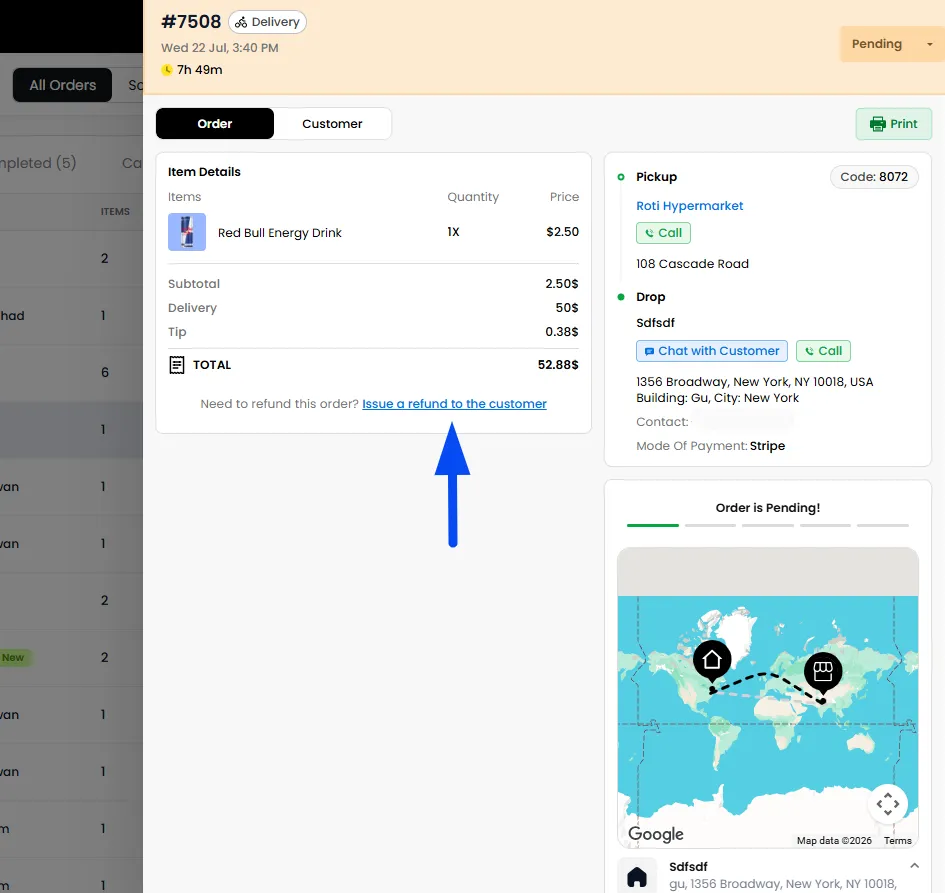
- On the Order Details page, click Issue Refund.
- The Refund window will open, where you can review the refund details, select the refund method, specify the refund amount, and process either a full or partial refund.
Issuing a Refund
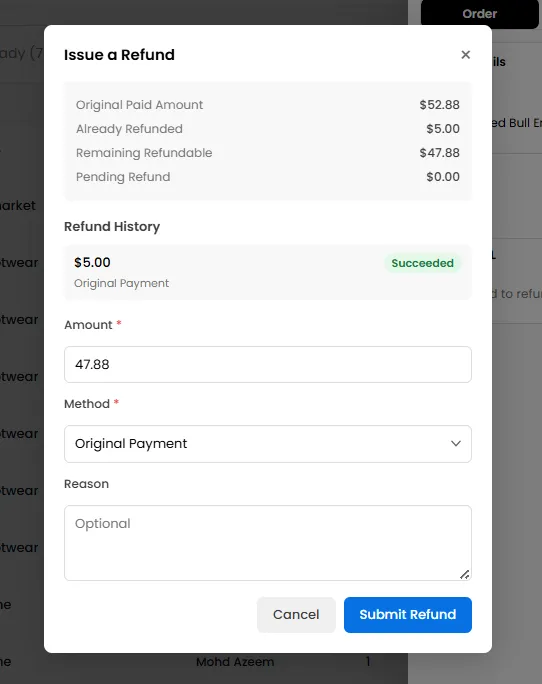
The refund window displays the following information before processing the refund:
- Original Paid Amount
- Already Refunded Amount
- Remaining Refundable Balance
- Pending Refund Amount
- Refund History
This gives complete visibility into previous refund activity before initiating a new refund.
Amount
Specify the amount you wish to refund.
You can issue:
- A full refund
- A partial refund
Example: If the customer paid $52.88 but one $10 product was unavailable, you can refund only $10 instead of the full order amount.
Refund Method
Choose how the refund should be processed.
Available options include:
Original Payment
Sends the refund back to the payment method originally used by the customer. This is supported only for payment methods made via Stripe.
Wallet Credit
Credits the refund amount directly to the customer's wallet balance for future purchases.
Note: The wallet points credited to the customer are calculated based on the Redeem Points configuration defined in the Loyalty Wallet settings. The refunded amount is converted into points according to the configured redemption ratio and added to the customer's wallet.
Note: Original Payment refund methods are currently supported only for Stripe transactions. When this option is selected, the refunded amount is automatically returned to the customer's original payment method.
For orders paid using other payment gateways, Original Payment refunds are not currently supported. In such cases, you can use the Wallet Credit option to credit the refund amount to the customer's wallet. The customer can then redeem this wallet balance as a discount on future orders.
For COD orders, the refund can only be made once the order has been marked as Completed.
Reason (Optional)
You may enter a reason explaining why the refund is being issued. Adding a reason helps maintain a clear refund history for future reference.
Viewing Refund Details in Reports
After processing refunds, you can review and track all refund-related transactions by exporting your order reports from the Admin Panel.
To include refund information in your reports:
- Navigate to Admin Panel > Analytics.
- Generate or export the required order report.
- In the Export Columns section, select the following fields: Refunded Amount and Refund Method
- Export the report.
The downloaded report will include the refunded amount and the refund method used for each applicable order, making it easier to reconcile refunds, maintain financial records, and review refund activity for individual merchants.
Note: The Refunded Amount and Refund Method fields are optional export columns. Ensure these fields are selected before exporting the report if you want refund information to be included.